E-generated Document Identification Number (DIN) for All
Communications Mandatory from 8 Nov 2019 – Customs Circular
·
DIN IT Application
will be Operational on DDM website from 08.11.2019
[CBIC Circular No. 37/2019 dated 5 November 2019]
 Subject: Generation and quoting of Document Identification Number (DIN)
on any communication issued by the officers of the Central Board of Indirect
Taxes and Customs (CBIC) to tax payers and other concerned persons- reg.
Subject: Generation and quoting of Document Identification Number (DIN)
on any communication issued by the officers of the Central Board of Indirect
Taxes and Customs (CBIC) to tax payers and other concerned persons- reg.
In keeping with the
Government's objectives of transparency and accountability in indirect tax
administration through widespread use of information technology, the CBIC is
implementing a system for electronic (digital) generation of a Document
Identification Number (DIN) for all communications sent by its offices to
taxpayers and other concerned persons. To begin with, the DIN would be used for
search authorization, summons, arrest memo, inspection notices and letters
issued in the course of any enquiry. This measure would create a digital directory
for maintaining a proper audit trail of such communication. Importantly, it
would provide the recipients of such communication a digital facility to
ascertain their genuineness. Subsequently, the DIN would be extended to other
communications. Also, there is a plan to have the communication itself bearing
the DIN generated from the system.
2. The Board in
exercise of its power under section 151A of the Customs Act, 1962 directs that
no search authorization, summons, arrest memo, inspection notices and letters
issued in the course of any enquiry shall be issued by any officer under the
Board to a taxpayer or any other person, on or after the 8th day of
November, 2019 without a computer-generated Document Identification Number
(DIN) being duly quoted prominently in the body of such communication. The
digital platform for generation of DIN is hosted on the Directorate of Data
Management (DDM)'s online portal "cbicddm.gov.in"
3. Whereas DIN is a
mandatory requirement, in exceptional circumstances communications may be
issued without an auto generated DIN. However, this exception is to be made
only after recording the reasons in writing in the concerned file. Also, such
communication shall expressly state that it has been issued without a DIN. The
exigent situations in which a communication may be issued without the
electronically generated DIN are as follows:-
(i) when there are technical
difficulties in generating the electronic DIN, or
(ii) when communication regarding
investigation/enquiry, verification etc. is required to issued at short notice
or in urgent situations and the authorized officer is outside the office in the
discharge of his official duties.
4. The Board also
directs that any specified communication which does not bear the electronically
generated DIN and is not covered by the exceptions mentioned in para 3 above,
shall be treated as invalid and shall be deemed to have never been issued.
5. Any communication
issued without an electronically generated DIN in the exigencies mentioned in
paras 3 above shall be regularized within 15 working days of its issuance, by:
(i) obtaining the post facto approval of the
immediate superior officer as regards the justification of issuing the
communication without the electronically generated DIN;
(ii) mandatorily electronically
generating the DIN after post facto approval; and
(iii) printing the electronically generated
pro-forma bearing the DIN and filing it in the concerned file.
6. In order to
implement this new facility of electronically generating the DIN, all Principal
Chief Commissioners/Principal Director Generals/ Chief Commissioners/Director
Generals shall ensure that all their authorized officers who have to
electronically generate the DIN are immediately mapped as users in the System
and are conversant with the process for auto-generating a DIN. In order to
successfully add users for the DIN utility and enable them to electronically
generate DINs, the following steps shall be followed:
(i)
The details of officers to be added as users of the DIN Utility such as
name, designation/Branch and official e-mail ld shall be fedinto the System
(the office of the officer being added will be auto populated);
(ii) The dashboard (Manage User) is provided with
add/activate/inactivate/delete and edit options which can be availed for namely
adding, activating, inactivating, editing and deleting the users as follows:
(a) Add:- Officers name/designation and branch can be added by
selecting appropriate designation and branch ,from the drop down menu provided
against the respective column.
(b) Activate:-
Once the user activates the URL and provides the user name and password and
OTP, the authorization will be processed by the system and shall be reflected
as Green Radio button.
(c) lnactivate:-Any
already added user who may be diverted on temporary basis to attend to some
other assignment in the case of administrative exigency, can be deactivated for
time being by dragging the Green Radio button to the left by which it will become
red in color showing the user's position as inactive. A confirmation e-mail
will also be sent to the respective user.
(d) Edit:-
This icon will always appear with Red Radio button (indicating the inactive
position of the user) and is provided for modifying/editing the
name/designation/branch/e-maid ld of the officer to be authorized.
(e) Delete:-
This icon can be used for deleting the already added user profile if the
officer is permanently transferred out from that office.
7.
Officers who have been added as users in the DIN utility shall electronically
generate DINs, as follows:
(i)
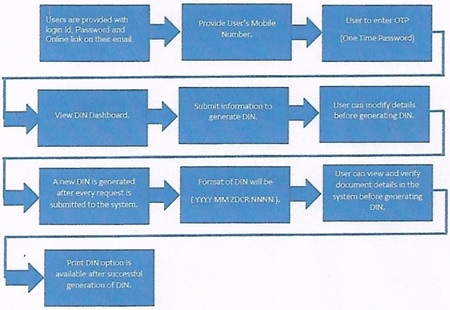
Every authorized user shall receive an e-mail on his official e-mail ld
after he/she is mapped into the DIN utility. This e-mail shall provide the user
of his/her user name and password. The same e-mail shall also provide an URL
online link.
(ii)
After clicking on the said URL link, the user shall be guided to the DIN
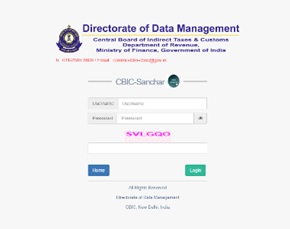
utility within CBIC-Sanchar on the DDM's online portal
"cbicddm.gov.in".
(iii) The user shall be required
to submit his/her mobile number on the screen page for purposes of verification
and then click "Get OTP" button for receiving a One Time Password
(OTP) on the mobile.
(iv) The user shall login to the
DIN utility by entering the OTP received.
(v) After successfully logging in, the user shall
see the Dashboard displaying different categories, for total number of summons,
search authorizations, inspection notices and arrest memos issued by the user.
Initially, the figures under each category shall be 'zero'.
(vi) The user shall click
"Generate DIN" on the Menu Bar located at the left hand side of the
screen and enter the details of the communication to be issued by choosing its
category and selecting the appropriate title of the communication from the
dropdown menu "Choose Document"
(vii) After filling in all the required information,
and clicking on the "View & Save DIN" button, the user shall see
a preview page. By clicking the "Back button", mistakes or
typographical errors, if any, can be rectified. Also, the user has the option
of partially entering details in the System at a time and coming back later to
retrieve the partially entered document (automatically saved in the System),
fill in the remaining details, and generate a DIN on a later occasion.
(viii) The last step is to click on the "Generate
DIN" button and a DIN shall be generated for that particular communication
by the System. The generated DIN cannot be edited.
(ix) A new DIN shall be generated each time a
request for generating it is submitted to the System.
(x) After the DIN is generated, the user shall
print the page bearing the DIN and file it in the concerned file while also
quoting the DIN on the communication.
8. The genuineness of
the communication can be ascertained by recipient (public) by entering the
CBIC- DIN for that communication in a window VERIFY CBIC-DIN on CBIC's website www. cbic.gov.in. Only in those cases where the DIN
entered is valid, information about the office that issued that communication
and the date of generation of its DIN would be displayed on the screen.
9. As aforementioned,
in the first phase beginning on 8th day of November, 2019, the "Generate
DIN" option shall be used for Search Authorizations, Summons, Inspection
Notices, Arrest Memos, and letters issued in the course of any enquiry. the
format of the DIN shall be CBIC-YYYY MM ZCDR NNNNNN where,
(a) YYYY denotes the calendar year
in which the DIN is generated,
(b) MM denotes the calendar month
in which the DIN is generated,
(c) ZCDR denotes the
Zone-Commissionerate-Division-Range Code of the field formation/Directorate of
the authorized user generating the DIN,
(d) NNNNNN denotes 6 digit alpha-numeric
system generated random number.
10. The electronic
generation of DIN and its use in official communications to taxpayers and other
concerned persons is a transformative initiative. Principal Chief
Commissioners/Principal Director Generals I
Chief Commissioners/Director Generals must become fully familiar with the
process involved. They are also urged to ensure that adequate and proper
training is provided to all concerned officers under their charge to ensure its
successful implementation. It is reiterated that any specified document that is
issued without the electronically generated DIN shall be treated as invalid and
shall be deemed to have never been issued. Therefore, it is incumbent upon all
officers concerned to strictly adhere to these instructions.
F. No. 394/39(14)/2018-Commr. (lnv.-Cus.)